
Setting up WhatsApp automation in Pakistan is now the single most important thing a small business can do to stop losing leads overnight.
If your business runs on WhatsApp and in Pakistan, almost every business does you already know the problem. Messages come in all day and all night. Customers want instant answers. But you cannot be available 24 hours a day, and hiring staff to manage WhatsApp around the clock is expensive and unreliable.
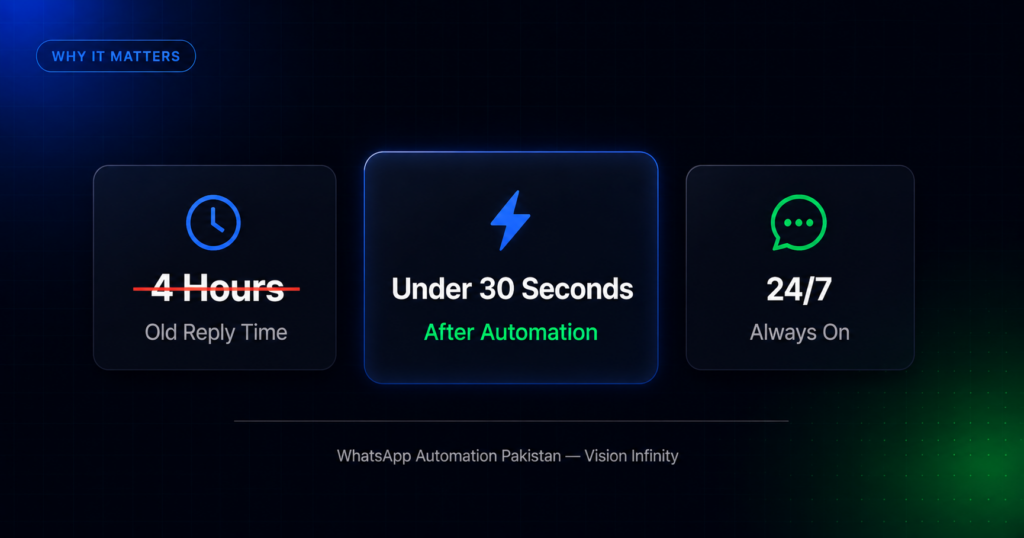
WhatsApp automation Pakistan solves this. Not by replacing your team, but by handling everything that happens before a conversation needs a human: the first reply, the qualifying questions, the appointment confirmation, the follow-up. All of it, automatically, in under 30 seconds.
This guide walks you through exactly how WhatsApp automation works for Pakistani businesses in 2026, what you need to get started, and how Vision Infinity sets it up for you in 7 days without any technical work on your end.
What Is WhatsApp Automation Pakistan and Why Every Business Needs It
WhatsApp automation connects an AI system to your WhatsApp Business number using the official WhatsApp Business API. When a customer messages you, the system reads the message, understands the intent, and replies instantly with the right information, whether that is a price, an appointment slot, a property detail, or an answer to a common question.
Official WhatsApp Business API pricing for Pakistan is published at business.whatsapp.com.
This matters more in Pakistan than almost anywhere else for three reasons.
Pakistan has over 50 million active WhatsApp users, and WhatsApp is the default way customers contact businesses. Unlike markets where email or phone calls dominate, Pakistani buyers open WhatsApp before they do anything else. If your response is slow, they move on.
Platforms like Daraz and Foodpanda have trained Pakistani consumers to expect instant responses. That expectation now applies to every business, including yours. A salon, a real estate agency, a clinic, a restaurant, customers now measure your professionalism by how fast you reply.
Meta Ads send leads directly to WhatsApp. Most businesses running Facebook and Instagram ads in Pakistan are sending traffic straight to a WhatsApp number. Those ads run at all hours. Without automation, every lead that arrives after 7 PM is lost before morning.
WhatsApp Business App vs WhatsApp Business API: What Is the Difference
Before setting anything up, it is important to understand which version of WhatsApp you actually need.
WhatsApp Business App is the free app you download on your phone. It supports basic features like a business profile, quick replies, and away messages. It works for very small businesses handling a handful of conversations per day. It has significant limitations: only one user can be logged in at a time, automation is minimal, and there is no way to connect it to external tools like a CRM or Google Sheets.
WhatsApp Business API is the official platform Meta provides for businesses that need automation, multi-agent access, and integrations. It does not have its own interface, it works in the background and must be connected to a platform or solution provider that handles the front end. This is what powers real automation: instant AI replies, lead scoring, appointment booking, order processing, and CRM sync.
If you are running Meta Ads, managing more than 20 conversations per day, or serving customers outside business hours, you need the API. The free app will not scale.
What WhatsApp Automation Can Do for Your Business
Before walking through the setup, it helps to understand the full scope of what a properly built WhatsApp automation system handles.
Instant replies around the clock. Every message is answered in under 30 seconds regardless of time. No more missed leads from night-time inquiries or weekend messages.
Lead qualification. The bot asks targeted questions to understand what the customer needs, budget, location, product type, urgency, and scores each lead as hot, warm, or cold automatically.
Appointment booking. For salons, clinics, consultants, and service businesses, the bot checks availability, confirms bookings, and sends reminders without any staff involvement.
Order processing. For restaurants and e-commerce businesses, the bot handles the full order flow, menu browsing, item selection, address collection, and payment confirmation.
Hot lead alerts. The moment a lead shows serious buying intent, your sales team gets an instant WhatsApp notification with the full conversation history attached. They only deal with buyers who are ready to move.
Automated follow-ups. Leads that do not convert immediately are followed up automatically at 1 hour, 24 hours, and 3 days. No lead is forgotten.
Bilingual conversations. The system auto-detects whether a customer is writing in English or Roman Urdu and replies in the same language. This is critical for Pakistani audiences where forcing English creates friction.
Pipeline visibility. Every conversation is logged, scored, and synced to Google Sheets or your CRM automatically. You wake up to an organised pipeline instead of 70 unread chats.
JazzCash and EasyPaisa integration. Payment links are sent automatically, confirmations are logged, and your team is notified of completed payments without any manual tracking.
How to Set Up WhatsApp Automation Pakistan: 8 Steps to Go Live
Here is exactly how the process works from start to a live system.
Step 1: Decide What You Need the System to Do
Before any technical setup begins, you need to be clear on the job the automation will handle. Different businesses need different configurations.
A real estate agency needs lead qualification, hot lead alerts, and pipeline tracking. A salon needs appointment booking, availability checks, and reminder messages. A restaurant needs an order flow, menu delivery, and payment collection. A clinic needs appointment scheduling, FAQ handling, and patient routing.
The clearer you are on the core job, the better the system performs. A good automation provider will walk you through this in a discovery call before building anything.
Step 2: Get a WhatsApp Business Number Ready
You need a phone number that is either not currently registered on WhatsApp, or a number you are willing to migrate from the regular WhatsApp Business App to the API.
Important: once a number is connected to the WhatsApp Business API, it cannot be used simultaneously on the WhatsApp Business App on a phone. Your team will manage conversations through the provider’s platform instead.
If you want to keep using your current number, migration is possible and your conversation history is preserved. If you are starting fresh, any Pakistani mobile number works.
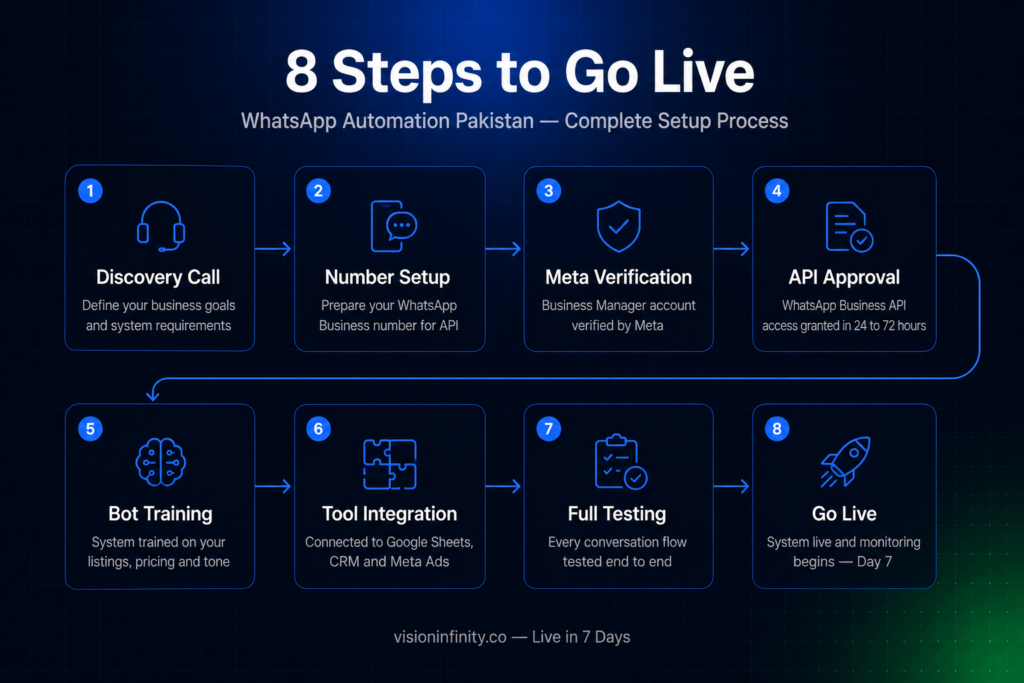
Step 3: Set Up Your Meta Business Manager Account
The WhatsApp Business API runs through Meta’s infrastructure, so you need a verified Meta Business Manager account. This is a free account at business.facebook.com that serves as the official business identity Meta recognises.
You will need to provide your business name, a business email address, and basic business information. Verification typically requires uploading a business registration document or utility bill. This step protects businesses and customers by ensuring only legitimate businesses can send automated WhatsApp messages at scale.
For Vision Infinity clients, our team handles this entire process on your behalf. You provide the documents and we manage the submission and approval.
Step 4: Get Your WhatsApp Business API Access Approved
Once your Meta Business Manager is verified, the next step is applying for WhatsApp Business API access. This connects your phone number to Meta’s API infrastructure.
Meta reviews the application and approves it based on your business type and the phone number you are registering. Approval typically takes 24 to 72 hours. During this time, your number is verified, your business profile is created on WhatsApp, and your messaging limits are set.
Your initial messaging limit allows you to initiate conversations with up to 1,000 unique customers per day. This limit increases automatically as your message quality improves and your volume grows.
Step 5: Build and Train the Automation System
This is where the real work happens, and it is the step that most determines how well the system performs.
A basic auto-reply is not enough. A properly built system needs to be trained on your specific business: your services and pricing, your most common customer questions, your tone of voice, your lead qualification criteria, and the actions you want it to take in different situations.
For a real estate agency, this means training the bot on your property types, areas you cover, price ranges, payment plan options, and what questions to ask to separate a serious buyer from a window shopper.
For a salon, this means loading your service menu, pricing, availability rules, booking confirmation process, and how to handle rescheduling requests.
For a restaurant, this means building the full menu flow, handling item customisation, collecting delivery addresses, and connecting to your payment system.
This stage typically takes 5 to 7 days when handled by Vision Infinity. We build the full conversation flow, test every branch, and make sure the system handles edge cases, the unusual questions, the Roman Urdu messages, the customers who go off-script.
Step 6: Connect to Your Existing Tools
The automation system becomes significantly more powerful when it is connected to the tools you already use.
Google Sheets sync means every lead, order, and conversation is automatically logged in a spreadsheet your team can access. No manual data entry. No missed records.
CRM integration means your sales pipeline is updated in real time. Hot leads appear immediately with their full conversation history, contact details, and qualification score.
Meta Ads integration means leads from your Facebook and Instagram campaigns are captured and responded to instantly, regardless of when they come in. Your ad spend stops being wasted on leads that never get a reply.
Step 7: Test Before Going Live
Before the system goes live with real customers, every flow needs to be tested end to end. This means running through the conversation as if you were a customer, asking questions the bot should handle, testing the booking flow, checking that hot lead alerts arrive correctly, and confirming that data is syncing to Sheets or your CRM.
Vision Infinity runs a full testing phase before handover. We deliberately try to break the system by asking unusual questions, switching between English and Roman Urdu mid-conversation, and simulating edge cases. Anything that fails gets fixed before your customers see it.
Step 8: Go Live and Monitor the First Two Weeks
Once the system is live, the first two weeks are an optimisation period. Real customer conversations reveal things that testing does not always catch, new questions the bot has not been trained to handle, edge cases that come up more often than expected, or flows that could be made smoother.
Vision Infinity monitors all conversations during this period, refines responses, and adjusts the flow based on what is actually happening. This is included in every plan.
After the optimisation period, the system runs independently. Performance reports covering response time, leads captured, appointments booked, and conversion rates are provided on a regular schedule so you can see exactly what the automation is doing for your revenue.
How Much Does WhatsApp Automation Cost in Pakistan
There are two cost components to understand.
Meta’s messaging fees apply when you initiate a conversation with a customer first, such as sending a follow-up message or a broadcast. In Pakistan, Meta charges approximately Rs. 12 to Rs. 18 per marketing message. When a customer messages you first and you reply within 24 hours, that service window is free.
Platform and setup fees are what you pay your automation provider. Vision Infinity charges a one-time setup fee to build and deploy the system, plus a monthly subscription for hosting, maintenance, support, and ongoing improvements.
| Plan | Setup Fee | Monthly |
|---|---|---|
| Starter | Rs. 30,000 | Rs. 12,000/mo |
| Growth (Most Popular) | Rs. 45,000 | Rs. 20,000/mo |
| Enterprise | Rs. 95,000 | Rs. 35,000/mo |
The Growth plan is the most common choice for businesses running Meta Ads. It includes lead scoring, hot lead alerts, Meta Ads integration, order capture, and a revenue dashboard.
No lock-in after 3 months. Cancel with 30 days notice.
Which Businesses Need WhatsApp Automation Pakistan the Most
WhatsApp automation works for any business where customers initiate contact on WhatsApp and where response speed directly affects conversion. Based on the businesses Vision Infinity has set this up for, the industries that see the clearest impact are:
Real estate agencies dealing with high-volume lead generation from Meta Ads, where a slow reply means losing a buyer to a competitor who replied faster.
Salons and beauty businesses that receive booking requests outside business hours and lose clients to competitors who have an instant booking system.
Clinics and healthcare providers missing patient inquiries after closing hours that could have been converted to appointments with an immediate response.
Restaurants and food businesses processing orders across multiple channels and losing sales when WhatsApp messages go unanswered during peak hours.
E-commerce stores selling on Shopify or WooCommerce and needing automated order confirmations, abandoned cart recovery, and COD verification without adding staff.
Fashion and boutique brands receiving product inquiries and order requests that pile up overnight while the business is closed.
Common Questions About WhatsApp Automation in Pakistan
Do I need technical knowledge to set this up?
No. Vision Infinity handles the entire setup including Meta Business Manager verification, API connection, bot training, and integration. You provide information about your business and we build the system. The handover includes a full training session so your team understands how to manage the pipeline and update the bot when needed.
You can create your Meta Business Manager account at business.facebook.com.
Will my WhatsApp number change?
No. The system connects to your existing WhatsApp Business number. Your customers continue messaging the same number they already have saved. The only difference they notice is that replies are instant.
Can the bot handle questions it has not been trained on?
Yes. For questions outside the bot’s training, the system either provides a graceful response that directs the customer to the right channel, or triggers a human handoff alert so your team can take over. On the Enterprise plan, this handoff is fully automated with the conversation history transferred to your agent instantly.
Is customer data safe?
The system uses the official WhatsApp Business API, which uses end-to-end encryption and meets Meta’s security standards. All conversation data is stored in your own Google Sheets or CRM. You own it completely and Vision Infinity never accesses your customer data beyond what is needed to build and maintain the system.
How quickly will I see results?
Most businesses see a measurable improvement within the first two weeks. Response times drop immediately on day one. Lead capture improves within the first week as off-hours inquiries start converting instead of going cold. Full revenue impact is typically clear within 30 days.
Get Your WhatsApp Automation Live in 7 Days
Every hour your WhatsApp sits unanswered, a competitor is closing the deal you paid to generate with your ad spend.
Vision Infinity builds and deploys your complete WhatsApp automation system in 7 days. Trained on your business. Connected to your existing number. Bilingual from day one. No technical knowledge required on your end.
Book a free 30-minute demo and we will show you the live system working for your specific industry before you commit to anything.
Or message us directly on WhatsApp: +92 312 877 9368